Using William Blake's classic poem. "The Tyger" as inspiration, the class has been writing their own animal poems. Again, we use animoto to turn our poems into animated musical videos. Teachers, If you are looking for a book that teaches how to teach poetry using great poems, then check out this post I made a couple of years ago on the book, "Rose, Where Did You Get That Red?"
Note: Kayla thinks that if William Blake can spell tiger as "tyger", then she can spell shark as "sharc". After all she was inspired by William Blake!
Monday, November 22, 2010


Friday, November 19, 2010
Mayan Projects
A packet was sent home today so that students can choose a Mayan project. Please turn in your 3 top choices as soon as possible. Here is a video of last year's class and their Mayan projects.
Tuesday, November 16, 2010
Exploring Tessellations

Today's math lesson involved the fascination world of tessellations.
Here is a site that will let you quickly create a tessellation.
Here is another Tessellation Creator.
Find "enter this site" on Totally Tessellated to explore the history and essentials of tessellations. You will learn how to modify and create tessellations. You will learn about the Dutch artist M. C. Escher and his famous tessellated designs and you can also explore advanced design, art, and other mathematical topics related to tesselations.
Have fun!
Monday, November 15, 2010
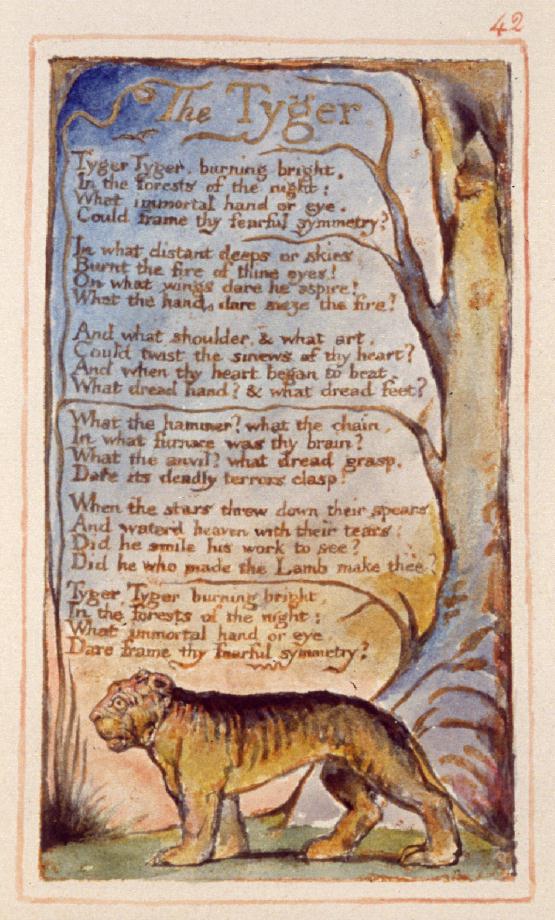
The Tyger
I created this animoto video to introduce my class to one of the great poems of the English language: William Blake's "The Tyger". We're going to be talking to the animals by writing our own poems based on "The Tyger".
Friday, October 29, 2010
Inca Projects and Presentations
This week the class presented their Inca projects, reports. and posters. You can see their work in the Animoto videos they created.
Monday, October 25, 2010
Piclits: Having Fun Using Vocabulary
Piclits is a creative and fun website that is all about Inspired Picture Writing. I used the site a couple of years ago with my one computer classroom and then forgot about it until I checked a blog post I wrote back then. Now I am in a classroom where each student can use a netbook and it was much easier to use this program.
Students can choose a picture. Then like refrigerator magnets they can choose precise vocabulary words from lists in located below the puzzle to arrange words into poems, sentences, messages, or labels. We just spent about 15 minutes playing around with the words and came up with many interesting piclits. I was happy to see that many students chose a poetry form based on William Carlos Williams "A Locust Tree in Flower". You can view each piclit by clicking or you can go to the website an create your own piclits. While having fun, we were introduced to wonderful and useful vocabulary words. Here are a few examples of our piclits.

See the full PicLit at PicLits.com
by Heather

See the full PicLit at PicLits.com
by Cameron

See the full PicLit at PicLits.com
by Molly

See the full PicLit at PicLits.com
by Adam

See the full PicLit at PicLits.com
by Cady

See the full PicLit at PicLits.com
by Campbell

See the full PicLit at PicLits.com
by Kayla

See the full PicLit at PicLits.com
by Amanda

See the full PicLit at PicLits.com
by Zak

See the full PicLit at PicLits.com
by Cody

See the full PicLit at PicLits.com
by Ben
Students can choose a picture. Then like refrigerator magnets they can choose precise vocabulary words from lists in located below the puzzle to arrange words into poems, sentences, messages, or labels. We just spent about 15 minutes playing around with the words and came up with many interesting piclits. I was happy to see that many students chose a poetry form based on William Carlos Williams "A Locust Tree in Flower". You can view each piclit by clicking or you can go to the website an create your own piclits. While having fun, we were introduced to wonderful and useful vocabulary words. Here are a few examples of our piclits.
See the full PicLit at PicLits.com
by Heather
See the full PicLit at PicLits.com
by Cameron
See the full PicLit at PicLits.com
by Molly
See the full PicLit at PicLits.com
by Adam
See the full PicLit at PicLits.com
by Cady
See the full PicLit at PicLits.com
by Campbell
See the full PicLit at PicLits.com
by Kayla
See the full PicLit at PicLits.com
by Amanda
See the full PicLit at PicLits.com
by Zak
See the full PicLit at PicLits.com
by Cody
See the full PicLit at PicLits.com
by Ben
Thursday, October 21, 2010
Everyday Math Multiplication Algorithms
Just a reminder that you can find examples of how to do the Everyday Math algorithms online. Today we are reviewing the Partial Products Method. This method gives student a good understanding of place=value and multiplication concepts. It also has the added benefit of facilitating student use of mental arithmatic as they solve problems. You can find many animations of the Partial Products Method here. Tomorrow we will be reviewing the Lattice Method of Multiplication. This is a very easy metod to use because it relies almost entirely on the recall of the basic multiplication facts. You can find many animations of the Lattice Method of Multiplication here.
Subscribe to:
Posts (Atom)


